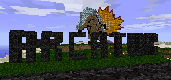
Arcator FTB (the Beast lives)
Download the Technic Launcher here.
Then type in "Arcator" into the search box inside the launcher and install!
other downloads:
Feed The Beast. here.
save the zip file, import with FTB and run
Multi MC. here.
save the zip file, import with MMC and run
Chromium Embedded Framework update!!
overwrite the files in your minecraft folder with this patch
(the one that has minecraftinstance.json in it)

There is a single glaring criticism to be had, and that is that no-one will want to use the server if they have to go through a load preliminary setup. I've never used MultiMC before, so what are the odds that other players have?
My suggestion is that you complete the pack and upload is as a 3rd party pack on the FTB platform, or use an FTB modpack, purely to make access several orders of magnitude easier.
It isn't that hard! Just download the pack, then import it to any launcher.
Done.
There is a single glaring criticism to be had, and that is that no-one will want to use the server if they have to go through a load preliminary setup. I've never used MultiMC before, so what are the odds that other players have?
My suggestion is that you complete the pack and upload is as a 3rd party pack on the FTB platform, or use an FTB modpack, purely to make access several orders of magnitude easier.